Programming Hardware-Level Mouse Macros to Bypass Software Restrictions and Improve Productivity
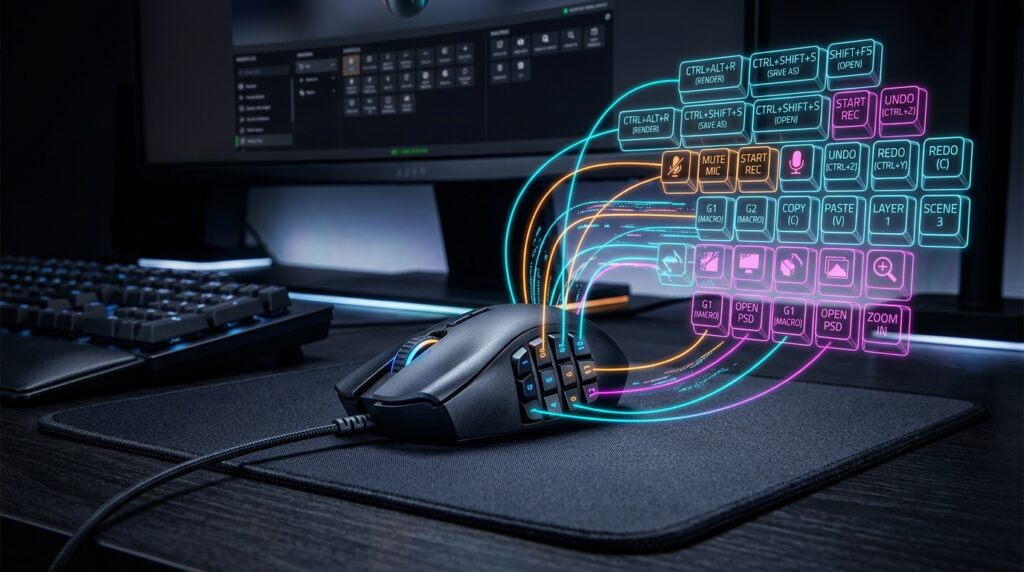
Programming Hardware-Level Mouse Macros to Bypass Software Restrictions and Improve Productivity
The majority of the time, modern workflows entail tasks that are repeated, which wastes time that is not essential and reduces overall efficiency. Office workers, designers, editors, developers, and analysts regularly conduct the identical combinations of clicks, shortcuts, and interface interactions hundreds of times each day. This is a common occurrence. The feature of mouse macros was added in order to automate these repetitive chores. This was accomplished by enabling specified input sequences to be executed quickly using the combination of programmable buttons and gesture triggers. Hardware-level mouse macros function differently from software-based macro systems because they store automation instructions directly inside the mouse’s firmware or onboard memory. This is in contrast to the majority of macro systems, which are dependent on software that runs within the operating system. It is possible for these macros to continue operating across a variety of apps and even circumvent some software-based input constraints. This is due to the fact that they operate independently from local software layers. In order to construct productive workflows that are efficient and do not introduce instability or compatibility concerns, it is vital to have a solid understanding of how hardware-level macros function, how they interact with the operating system, and how to set them in a responsible manner.
Determining What Hardware-Level Mouse Macros Are and How They Work
The term “hardware-level mouse macro” refers to a series of inputs that are recorded directly inside the onboard memory of the mouse, as opposed to depending only on software that is operating within Windows. In addition to keyboard shortcuts, timed clicks, cursor movements, and complicated command chains that are assigned to programmable buttons, these macros may also contain other possibilities. Following the completion of the configuration process, the mouse will automatically transmit the predetermined input sequence to the operating system whenever the trigger that has been assigned is active. Due to the fact that the macro logic is included inside the hardware firmware, the automation may continue to operate even when the companion software is not currently being used. Because of this independence from hardware, there is increased portability and consistency across a variety of programming languages and operating systems.
Several Reasons Why Software Automation Is Different from Hardware Macros
programs running in the background are what allow software-based macros to function. These programs are responsible for capturing input events and generating automated instructions via the operating system. Although they are adaptable, these tools are susceptible to software incompatibilities, constraints on permissions, and restrictions that are application-specific within their scope. Because the operating system perceives the instructions created by the macros as regular input coming from a typical peripheral device, hardware-level macros are able to circumvent a significant number of these requirements. By making this difference, compatibility is improved in settings where software automation tools could be limited or disallowed. Because the automation logic is executed inside the device firmware rather than continually using system CPU and memory resources, hardware macros also minimize the amount of resources that are used in the background.
To What Extent Does Onboard Memory Allow for Independent Execution?
For the purpose of storing profiles, button mappings, and macro sequences on the mouse’s internal memory, programmable gaming and productivity mice often incorporate onboard memory. Following the uploading of these settings to the device, they continue to exist independently from the host computer. When linked to a different system, the mouse is able to maintain its personalized behavior without the need for any setup. As a result of the fact that the mouse firmware runs instantly after being activated via USB connection, onboard storage also makes it possible for macros to function prior to the user logging in in some circumstances. These devices are especially useful for cross-system workflows and portable productivity environments since they have the capability to conduct automation straight from the hardware.
Enhancing the Productivity of Workflow Operation Through Input Automation
By minimizing the number of recurrent manual interactions, hardware-level macros have the potential to considerably boost productivity level. It is possible to compress into a single button press complex shortcut combinations that would typically take numerous keystrokes. When automated via the use of hardware triggers, repetitive editing commands, file management chores, and navigation operations become both more efficient and more consistent. When it comes to editing software, creative professionals often make use of macros for tasks such as timeline navigation, layer management, and transitioning between tools. It is possible for developers to automate code compilation instructions or terminal sequences, while office users may expedite repetitive spreadsheet or document formatting activities. The reduction of repeated input strain over time leads to improvements in both efficiency and consistency of productivity.
How to Get Around Shortcut Restrictions at the Application Level
For reasons of stability or security, several programs restrict the capabilities of external scripting or prohibit the implementation of bespoke software automation. As a result of the fact that hardware-level macros seem to be common human input, they are often able to function in contexts where software automation tools are not available. According to the applications, the instructions that are created by macros are interpreted as regular keyboard or mouse action that originates directly from the user. Productivity increases are able to work even in limited contexts that block external automation applications because of this. On the other hand, it is essential to have a thorough awareness of the ethical and policy consequences of circumventing input limits, especially in contexts that are regulated corporations or competing organizations.
Precision in Timing and Stability at the Macro Level
Hardware-based macro execution offers a number of benefits, one of the most significant being constant timing accuracy. Automation sequences that are handled internally by the mouse firmware are often more reliable and predictable than software-driven automation that is impacted by operating system scheduling. This is because the mouse firmware is responsible for processing the sequence. There is a correlation between consistent timing and increased dependability in activities that are repeated and rely on synchronized input sequences. However, if applications need certain response time between instructions, then delays that are incorrectly set might still cause instability. For the purpose of ensuring stable operation across a variety of software environments, it is essential to make careful adjustments to the implementation speed and sequence timing.
The Importance of Macro Utilization in a Responsible Manner
Despite the fact that hardware-level macros boost performance, their inappropriate application might lead to concerns such as ethical or operational issues. Automation that is too aggressive may cause unwanted actions to be triggered, may interfere with application operations, or may breach acceptable-use standards in some situations. It may be possible for competitive software platforms, secure business systems, and restricted online services to completely forbid automated input behavior, independent of the implementation mechanism. It is the responsibility of users to ensure that the use of macros continues to line with workflow productivity rather than exploitative automation methods or activities. Rather of attempting to sidestep the intended behavior of the system in an unfair manner, responsible configuration focuses on eliminating repeated manual strain.
The Management of Profiles Across Various Workflow Settings
Multiple onboard profiles that may be customized to suit a variety of applications or processes are supported by a large number of modern programmable mice. Different configurations may be customized for different situations, such as those used for video editing, software development, office work, or creating creative designs. It is possible for users to preserve very specific macro layouts without having to constantly reconfigure them if they switch profiles dynamically. The fact that each workflow environment maintains context-specific button assignments is another reason why proper profile structure helps decrease the occurrence of inadvertent command execution. Keeping macro structures that are well-documented and well labeled helps to enhance their long-term usage and minimizes misunderstanding in the workflow.
Avoiding the Most Frequent Problems with Macro Configuration
When incorrectly constructed, complex macro sequences have the potential to create unexpected behavior. It is possible for macros to run wrongly if they coincide with overlapping shortcuts, severe time compression, or changes in application focus. Additionally, some programs interpret quick automated inputs in a manner that is distinct from human interaction, which results in behavior that is inconsistent. In order to ensure that macros are functioning properly in production settings, it is essential to do exhaustive testing on them under actual workflow circumstances. Alterations to the operating system, adjustments to applications, and firmware upgrades are all potential factors that might influence macro compatibility over time. Validation on a regular basis guarantees that automation will continue to be dependable and stable.
Using hardware automation to construct workflows that are sustainable in terms of productivity
When intelligently incorporated into more comprehensive workflow optimization initiatives, hardware-level macros show the greatest potential for effectiveness. It would be more beneficial for them to minimize repeated low-value operations while maintaining control and flexibility rather than completely removing user engagement. The combination of hardware automation with effective keyboard shortcuts, workspace organization, and application settings that are simplified results in a considerable increase in long-term productivity and a reduction in repeated strain. Programmable input devices provide important options to increase efficiency without depending heavily on external automation software. This is particularly useful as contemporary processes continue to become more software-intensive. It is possible for users to construct computer environments that are more dependable, quicker, and more ergonomic if they have a thorough grasp of both the capabilities and constraints of hardware-level macro systems respectively.