Fixing Jagged Diagonal Lines in Tech Product Thumbnails Using Sub-Pixel Antialiasing

Fixing Jagged Diagonal Lines in Tech Product Thumbnails Using Sub-Pixel Antialiasing
The appearance of jagged diagonal lines is a typical visual problem in the thumbnails of technological products, particularly when the photographs are shrunk or compressed for usage on the web. These rough edges, which are sometimes referred to as aliasing artifacts, have the potential to make graphics that are otherwise of excellent quality look unpolished and out of professional standards. When it comes to technology blogs, which depend significantly on clear and crisp photography, even tiny errors might undermine the visual trustworthiness of the content. Sub-pixel antialiasing provides a more sophisticated solution than conventional approaches by smoothing edges on a more granular level than those methods often used. That is, rather than just blending pixels, it makes use of the way that displays generate color channels in order to produce transitions that are more seamless. When it comes to diagonal edges, tiny lines, and delicate user interface elements, this method is extremely successful. It has the potential to significantly enhance the vividness and sharpness of thumbnails when it is applied appropriately. When it comes to generating high-quality images, it is very necessary to have a solid understanding of how to include sub-pixel antialiasing into your workflow. It guarantees that your photographs will always have a polished and professional aspect, regardless of the device they are viewed on.
Learning the Reasons Behind the Appearance of Jagged Edges in Thumbnails
Generally speaking, jagged edges are the result of scaling down high-resolution photos without using the appropriate antialiasing algorithms beforehand. When the size of the picture is decreased, the diagonal lines lose their pixel sharpness and seem stepped or uneven across the image. Images of technological products that have sharp edges, writing, or geometric forms are particularly prone to displaying this phenomenon. These artifacts may be further exacerbated by compression and resampling techniques that are not performed correctly. Scaling algorithms of poor quality often fail to maintain the smoothness of the edges, which therefore results in noticeable distortion. As a result of the fact that defects are more readily seen on high-density screens, the problem becomes more serious. The first step in figuring out how to cure jagged edges is to identify the underlying source of the problem. These artifacts may be considerably reduced with the use of appropriate picture processing and scaling techniques. By addressing this issue at an earlier stage in the process, greater outcomes will be achieved in the end.
The Actual Function of Sub-Pixel Antialiasing Sub-pixel antialiasing is a technique that works by modifying the various color components that are included inside a pixel in order to provide smoother transitions between edges. However, rather than considering each pixel as a single unit, it makes adjustments to the red, green, and blue channels in a distinct manner. This enables a more precise control over the manner in which edges are produced, which ultimately results in a more refined look. In order to do this, the approach makes use of the structure of display displays, in which each pixel is made up of many sub-pixels. It does this by intelligently spreading color information, which in turn lowers the appearance of jagged edges. This technique is more sophisticated than the conventional antialiasing approach, which only uses surrounding pixels to blend together. The sub-pixel rendering technique is very useful for showing diagonal lines and other minute features. Furthermore, it improves clarity without greatly increasing the size of the file. By gaining an understanding of this notion, you will be better able to properly implement it within your design process.
To get the best possible results, high-resolution source images are prepared.
One of the most important factors that determines the quality of the final thumbnail is the resolution of the original picture. Beginning with a picture that has a high resolution adds more information to the scaling process, which ultimately results in edges that are smoother. It is more difficult to correct jagged lines in low-resolution photographs because these images lack the information that is necessary for effective antialiasing. From the beginning of the editing process to the end, it is essential to keep the original quality intact. By converting layers into smart objects, scalability may be maintained without causing any damage to the structure. Because of this, you are able to experiment with various sizes without the picture being negatively affected. Adjusting the contrast and sharpness of the image before shrinking it is also part of the effective preparation. Taking these measures helps to maintain the edge definition when scaling occurs. In order to get the best possible outcomes, a solid foundation is very necessary.
Implementing Resampling Techniques of a High-Quality During Data Scaling
Resampling is an essential component in the process of resizing photographs and maintaining the integrity of an image’s edges. During the scaling process, high-quality resampling approaches are meant to keep the details intact while simultaneously minimizing artifacts. Through careful selection of the appropriate algorithm, the look of diagonal lines may be substantially enhanced. In order to produce transitions that are more seamless, advanced resampling methods evaluate the pixels that surround them. This lessens the stair-step look that is often seen in photographs that have been scaled incorrectly. In order to prevent a gradual decline in quality over time, it is essential to avoid repeatedly resizing the image. As an alternative, scale the picture straight from the original to the size you want it to be. Better visual results may be achieved by the consistent use of high-quality resampling. When it comes to reducing aliasing artifacts, this step is really necessary.
Sharpening and applying a little blurring effect in order to refine the edges
Additional edits may assist smooth edges and increase overall clarity once the image has been resized from its original size. It is possible to smooth out any residual jagged edges with a tiny blur without having an effect on the overall picture. Careful use of this is required in order to prevent the loss of essential information. Restoring sharpness to crucial areas may be accomplished by selective sharpening after this step. This combination produces a look that is well-balanced, with edges that are distinct while yet being smooth. However, it is essential to implement these modifications in a selected manner rather than on a worldwide scale. The overprocessing of data might result in findings that are not natural or can add new artifacts. These settings demand careful attention to detail as well as experimentation in order to be fine-tuned. The thumbnail’s final look is improved when the edges are refined in the appropriate manner.
Utilizing Layer Masks to Make Corrections That Are More Specific
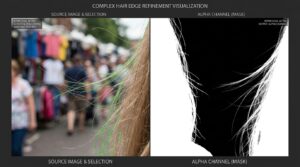
When repairing certain parts of a picture, layer masks provide for fine control over the correction process. Through the use of masks, you are able to pay attention to troublesome edges rather than making alterations to the whole thumbnail. This comes in very handy when dealing with complicated photos that have varied degrees of detail. The application of tailored smoothing and sharpening may be accomplished by separating regions that include jagged lines. By using this technique, the quality of areas that are not harmed is maintained. Additionally, layer masks permit non-destructive editing, which makes it possible to make adjustments with ease. This degree of adaptability is very necessary in order to keep complete control over the end output. By correctly using masks, one may enhance both their accuracy and their efficiency. This guarantees that the modifications are performed precisely where they are required.
Making Adjustments to Export Settings in Order to Maintain Smooth Edges
The final quality of your thumbnails may be significantly influenced by the specific export parameters that you use. Incorrect compression may cause jagged edges to appear again, even after meticulous editing has been performed. The selection of the appropriate compression level and format is quite necessary in order to maintain smooth lines. Options for compression that are either lossless or of excellent quality are often favored for technological images. Additionally, it is essential to preview the picture that has been exported in order to check for any abnormalities. Consistent export settings contribute to the preservation of a quality that is consistent across all thumbnails. To guarantee that photos load fast without compromising their quality, proper optimization is an essential component. Both the user experience and the performance of search engine optimization need this equilibrium. A careful approach to exporting ensures that the integrity of your work is preserved.
Creating a Workflow That Is Consistent in Order to Achieve Professional Results
It is necessary to have a methodology that is both organized and repeatable in order to provide consistently smooth thumbnails. This comprises beginning with source photos of a high quality, using appropriate scaling algorithms, and adding enhancements that are specifically targeted. In order to enhance efficiency and cut down on mistakes, some aspects of the process might be automated. By storing presets for resampling, sharpening, and export settings, you can guarantee that your projects are consistent with one another. By examining your process on a regular basis, you may find areas that might need improvement. Enhancing the overall professionalism of your blog is accomplished by maintaining a consistent image quality. The ability to manage enormous amounts of material without sacrificing standards is made possible by a method that is dependable. By continuously honing your strategy over time, you will be able to obtain outcomes that are of consistently excellent quality. The key to long-term success in the development of visual content is having a process that is well established.