Revealing Hidden and Ghosted Hardware Devices in Device Manager to Fix Legacy Driver Conflicts
Revealing Hidden and Ghosted Hardware Devices in Device Manager to Fix Legacy Driver Conflicts
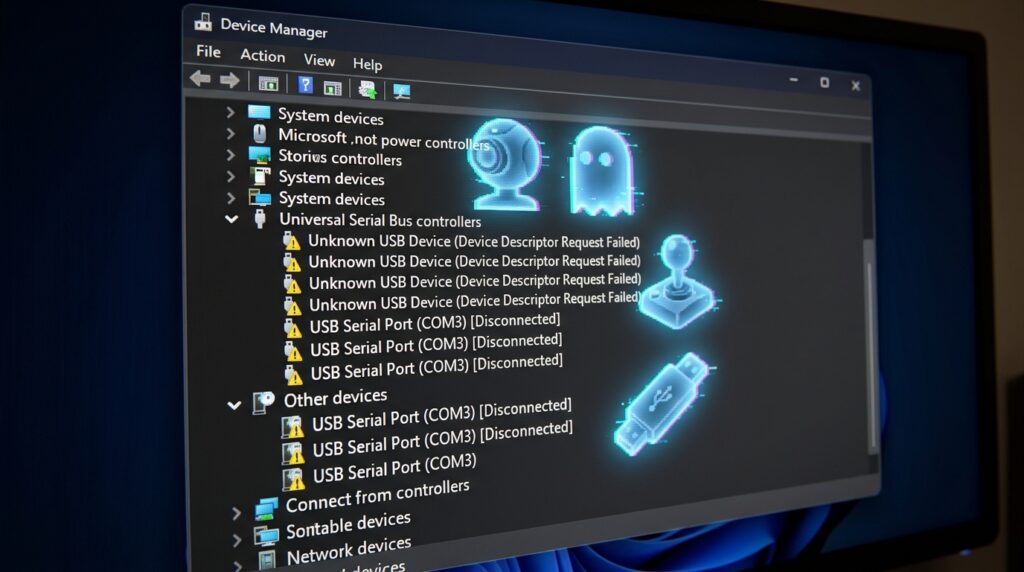
Even after the hardware devices in question have been physically detached from the computer, Windows systems often continue to store information on the hardware devices that were connected to them in the past. These residual entries, which are widely known as buried or ghosted devices, continue to be preserved inside the operating system along with the drivers, settings, and resource allocations that are associated with them. Over the course of time, these remains may lead to driver conflicts, hardware instability, and unanticipated performance difficulties. This is particularly true for systems that often replace hardware components or utilize several external devices. As a result of the fact that ghosted devices are concealable by default, a significant number of users are unaware that obsolete hardware profiles are still operating in the background. The Device Manager offers a method for revealing and managing these hidden entries, which enables users to eliminate settings that are no longer relevant and resolve conflicts that are brought about by older drivers. For the purpose of preserving a clean and stable hardware environment, it is vital to have a solid understanding of how Windows maintains information about hardware and how ghosted devices interact with other drivers.
Comprehending the Methods by Which Windows Stores Configurations of Hardware
Windows develops a device profile whenever hardware is attached to a Windows system. This profile contains driver associations, hardware IDs, resource allocations, and configuration data. It is created whenever a Windows system is linked to hardware. Microsoft Windows often remembers this information even after the hardware has been unplugged in order to make subsequent reconnections easier. It is particularly typical for USB devices, graphics adapters, network interfaces, and audio gear to exhibit this behavior. Keeping these profiles might make things more convenient, but it also means that entries for obsolete devices will collect over time. Additionally, these dormant entries continue to remain inside the system registry and driver database, which may cause possible interference with the hardware configurations that are already in place. By gaining an understanding of this persistent storage paradigm, one may get an understanding of why driver conflicts can remain even when the hardware that is causing the complications is no longer physically present.
Explaining What Ghosted Devices Are and Why They Are Important
Inactive hardware entries that continue to be recorded in the operating system despite the fact that they are no longer remotely connected or installed are referred to as ghosted devices. The usual view of the Device Manager does not display these devices since Windows has the presumption that they are not relevant at the moment. On the other hand, their drivers and settings could still load completely during the startup process or compete with one another for system resources in the background. This becomes troublesome when newer hardware utilizes drivers or resource allocations that are identical to those of older hardware, which may result in conflicts, duplicate device instances, or unstable behavior from the system. In addition, ghosted devices have the potential to disrupt driver upgrades by allowing Windows to refer to obsolete configurations rather than the most recent hardware profiles. When attempting to resolve chronic hardware-related issues, it is sometimes important to locate and delete these inactive items by identifying them.
Typical manifestations of conflicts caused by legacy drivers
Hidden devices may create driver conflicts, which can appear in a variety of ways. Some of these ways include difficulties in hardware recognition, unpredictable disconnections, unreliable peripherals, or repeated driver installation prompts. There is a possibility that audio devices could vanish without warning, that network adapters will function in an inconsistent manner, and that graphics drivers will fail to start properly. It is possible that Windows may try to load obsolete hardware settings during the starting process, which may result in prolonged boot times for some applications. The occurrence of conflicts is especially prevalent after significant hardware updates, the replacement of the motherboard, or the recurrent installation of external devices that are identical. The core cause of these difficulties is often difficult to detect without disclosing ghosted hardware entries. This is due to the fact that the conventional Device Manager interface conceals the main cause.
Bringing to Light Devices That Have Been Hidden Device Manager
A feature that is included in Device Manager is the ability to reveal hidden hardware entries. This feature enables users to examine devices that are ordinarily hidden, such as those that are inactive or unplugged. The ghosted devices, if activated, have a more faded or semi-transparent appearance in comparison to the active hardware. The whole history of installed devices that are connected with the system is shown in this enlarged view. This includes outdated drivers and configurations that are not currently being used. By carefully reviewing these entries, it is possible to detect obsolete hardware profiles that may no longer be required. Due to the fact that it reveals conflicts that would otherwise go unnoticed throughout the course of typical troubleshooting operations, the disclosure of hidden devices is an essential diagnostic step.
Determine which hardware entries are obsolete and which are duplicates
Following the completion of the display of hidden devices, the subsequent stage involves determining whether entries are either out of date or might possibly cause issues. Common candidates for removal include hardware that is no longer in use, obsolete peripherals, and duplicate devices. There are often several instances of devices that are linked with failed installs or replacement hardware, each time with slightly different IDs. These duplicate entries have the potential to cause confusion within the driver management system and to impede the correct setup of the hardware. Due to the fact that certain concealed entries may correspond to presently installed hardware that is only momentarily dormant, careful inspection is essential. It is possible to prevent unintentional interruption of active system components by removing those devices that have been proven to be outdated.
Removing Ghosted Devices in a Secure Manner
When ghosted devices are deleted, the driver profiles and configuration records that are connected with them are removed from the active version of the hardware database. Through the usage of this cleaning procedure, problems that are brought about by obsolete resource assignments or legacy drivers that are incompatible are eliminated. In the event that unforeseen problems emerge, it is advised that a system restore point be created before any devices are removed from the system. Remove devices in stages rather than all at once. This will give the system time to settle and will make it simpler to fix any issues that may arise following the removal of the devices. When Windows has finished removing outdated items, it will be able to create cleaner hardware configurations during the subsequent device detection cycle. In addition to reducing danger, removal that is both safe and thorough increases the overall stability of the system.
Resolving Conflicts Regarding the Distribution of Driver Resources
Even when they are not actively using the system, hidden devices have the ability to reserve system resources such as interrupt requests, communication ports, or memory ranges. This may prohibit the hardware that is currently in use from acquiring the resources that it need in order to function properly. The removal of outdated device information compels Windows to recalculate and allocate resources in a manner that is more effective. The majority of the time, this fixes problems that include the failure of the device to initialize or unstable behavior on the peripheral. Conflicts over resources are particularly prevalent in computer systems that have numerous generations of hardware drivers that are very similar installed over the course of time. Eliminating ghosted entries cuts down on the amount of unwanted competition for system resources and makes the driver environment more straightforward overall.
Through the course of time, maintaining a clean hardware environment
In order to avoid future conflicts with legacy drivers, it is necessary to perform routine maintenance and to engage in rigorous hardware management techniques. Reviewing hidden Device Manager entries on a regular basis is beneficial for systems that often connect external devices or undergo hardware updates such as these. It is possible to decrease the long-term buildup of outdated configurations by ensuring that drivers are kept up to date and by eliminating unneeded hardware profiles. It is also beneficial to remove hardware in the correct manner before removing it permanently whenever it is feasible to do so, since this encourages Windows to clear linked entries automatically. Maintaining a hardware configuration environment that is simplified enhances the stability of the system, makes troubleshooting easier, and decreases the risk of hidden driver conflicts impacting future device installs.